Web Nerdism w/ PHP 101 › Basics
Request and Response
Phillip Harrington Nov 2026
The last lesson showed the shape of an HTTP exchange: a request goes out, a response comes back, each with a first line, some headers, a blank line, and maybe a body. This one goes through them line by line, because nearly everything a PHP app does is reading the one and writing the other.
The Request
POST /comments HTTP/1.1
Host: example.com
Content-Type: application/x-www-form-urlencoded
Content-Length: 21

name=Alice&comment=Hi
The first line is the request line: a method, a path (with any query string), and the protocol version. Then headers, a blank line, and the body, if there is one.
Methods
The method is the verb: what the client wants done with the path.
- GET: give me this. Following a link is a GET.
- POST: here's something for you. Submitting a form is a POST.
- PUT and PATCH: replace this, or change part of it.
- DELETE: remove this.
- HEAD: like GET, but only send the status and headers. It's what
curl -Iuses.
The most important rule about methods: a GET must never change anything. Browsers, search engines and email scanners follow links freely, assuming that's safe. Anything that changes data (deleting, approving, buying) belongs behind a POST. There are a few more methods, like OPTIONS, which comes up in CORS, but these are the ones you'll use.
Request Headers
Name, colon, value, one per line. Some you'll see on almost every request:
- Host: which site this is for. One server can host many sites, and this is how it tells them apart. It's the only one HTTP/1.1 requires.
- User-Agent: which program is asking: a web browser, curl, PHP, a phone app.
- Accept and Accept-Language: what kinds of content, and which languages, the client prefers.
- Cookie: what the server asked the browser to remember.
- Referer: the page the link was on.
- Content-Type and Content-Length: what's in the body, and how big it is, when there is a body.
The Request Body
GETs usually don't have one. A POST from a form sends the fields as name=value pairs, like a query string. A POST from JavaScript often sends JSON instead. The Content-Type header says which.
The Response
HTTP/1.1 303 See Other
Location: /post#comments
Content-Length: 0
The first line is the status line: the protocol version, a status code, and a short reason. Then headers, a blank line, and the body.
Status Codes
The first digit tells you the family. The classic summary:
HTTP status ranges in a nutshell:
1xx: hold on
2xx: here you go
3xx: go away
4xx: you fucked up
5xx: I fucked up
You'll rarely see a 1xx. The rest, with the ones you'll meet most:
- 2xx, it worked.
200 OK,201 Created,204 No Content. - 3xx, look elsewhere.
301(moved for good),302and303(go here instead, for now), and304 Not Modified(the copy you already have is still good). - 4xx, you did something wrong.
400(that request makes no sense),401(who are you?),403(I know who you are, and no),404(the classic "file not found"),422(I understood it, and it's not valid),429(slow down). - 5xx, I did something wrong.
500(the code broke),502and503(something behind me is down or overloaded).
Be specific, and pick the code that says what actually happened: a client can act on a 429 in a way it can't on a vague 400. With one big exception: be vague with anything an attacker could learn from. A login that fails says "wrong email or password," never which one. That gets a lesson of its own, in Style.
Response Headers
- Content-Type: what the body is. The next lesson is all about it.
- Content-Length: how big the body is.
- Location: where to go instead, with a 3xx. The browser follows it.
- Set-Cookie: something for the browser to remember and send back.
- Cache-Control: whether, and how long, anyone may keep a copy.
How It Works
The two examples above are one real exchange, the one that runs every comment form:
- You fill in the form and press Submit. The browser sends the POST.
- The server saves the comment.
- It answers
303 See Other, with aLocationback to the post. - The browser follows it with a GET, and shows the page with your comment.
Why the detour? If the server answered the POST with the page directly, reloading it would send the POST again, and you'd post your comment twice. After the redirect, reloading just repeats the harmless GET. It's called Post/Redirect/Get, or PRG.
Try It
Make a server that shows you the request it got. In a folder, make index.php:
<?php
if ($_SERVER['REQUEST_URI'] === '/teapot') {
    http_response_code(418);
}
header('Content-Type: text/plain');

echo $_SERVER['REQUEST_METHOD'], ' ', $_SERVER['REQUEST_URI'], "\n\n";
foreach (getallheaders() as $name => $value) {
    echo "$name: $value\n";
}
echo "\n", file_get_contents('php://input'), "\n";Start it the usual way:
docker run --rm -it -p 8000:8000 -v "$PWD":/app -w /app php:8.4-cli php -S 0.0.0.0:8000Open http://localhost:8000/hello in a browser: the method, the path, and every header your browser sent. (Any path works, because PHP's built-in server sends a path that isn't a file to index.php. Only the built-in server does that on its own; nginx, Apache and the rest have to be told to, which is Single Point of Entry.)
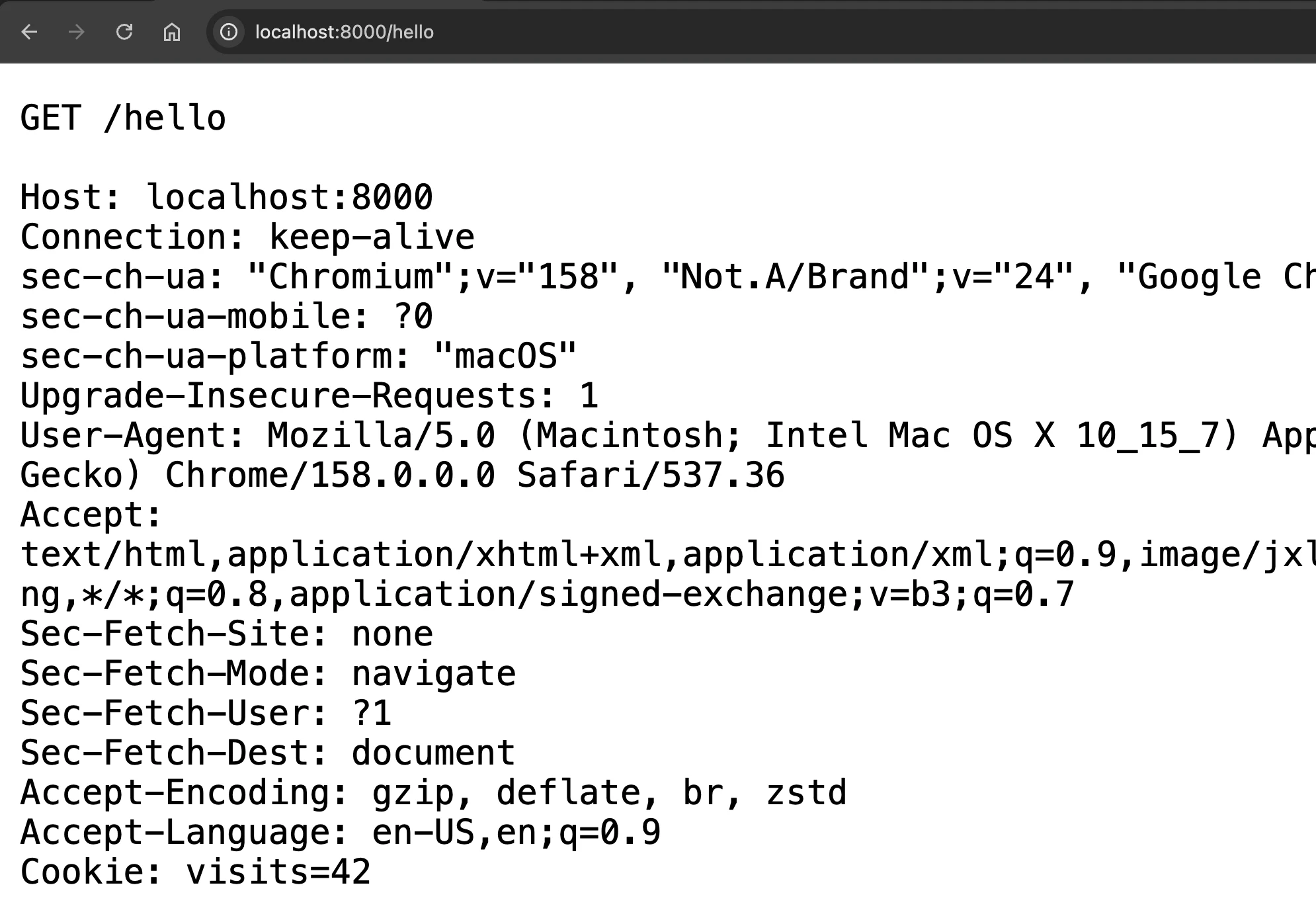
Then, from a second terminal, send a POST with a body:
curl -d 'name=Alice&comment=Hi' http://localhost:8000/commentsNew here:
-d- Send this data as the request body. That makes it a POST.
'name=Alice&comment=Hi'- The data, as form fields. The single quotes keep the terminal from treating the
&as a command of its own.
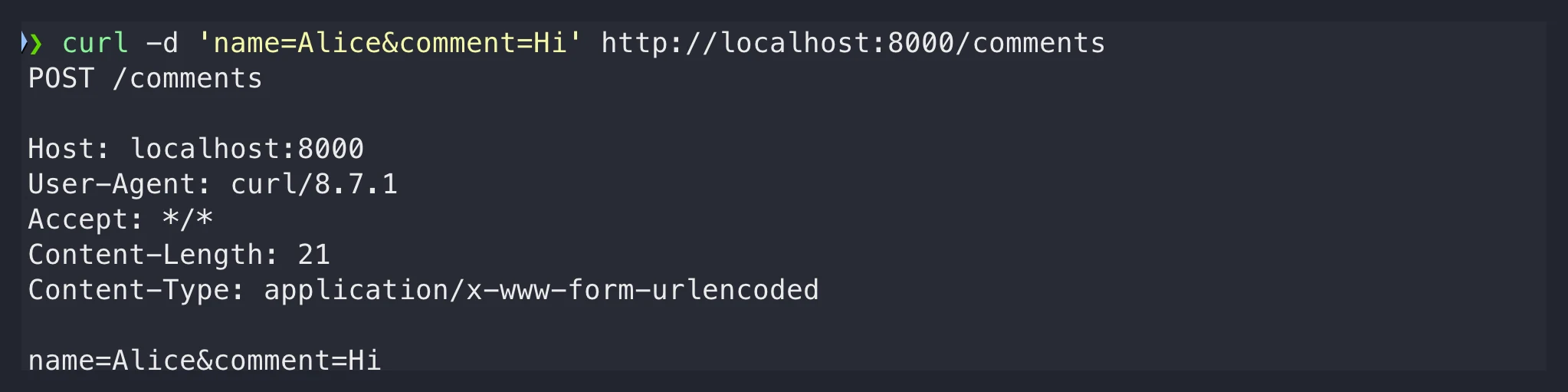
Now it's a POST, with a Content-Type, a Content-Length, and the body at the bottom. Last, look at the response instead. -i shows the status line and headers:
curl -i http://localhost:8000/teapot-i- Include the response's status line and headers in the output, above the body.
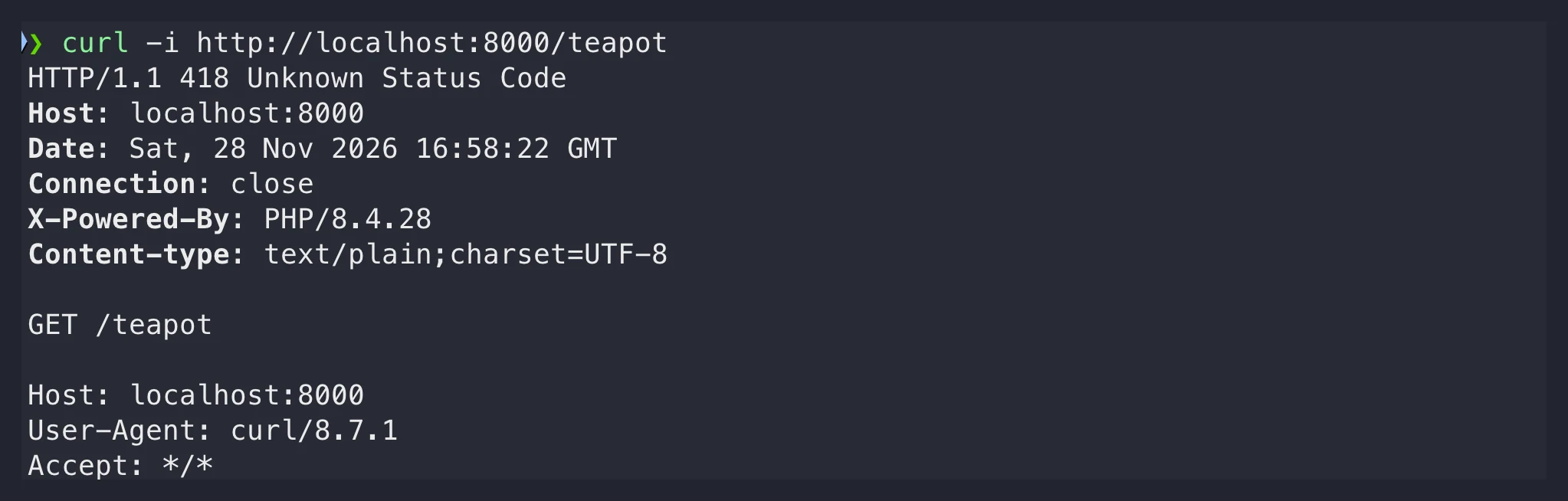
418, and PHP's built-in server calls it "Unknown Status Code." It never got the joke.
New to Docker or the terminal? Tools has the setup.
In PHP
- Reading the request:
$_SERVER['REQUEST_METHOD'],getallheaders(),$_GETfor the query string,$_POSTfor form fields, andfile_get_contents('php://input')for any other body, like JSON. - Writing the response:
http_response_code()for the status,header()for each header, and anything youechois the body. - A redirect is both at once:
header('Location: /post', true, 303);and thenexit;.
Gotchas
- "Headers already sent." Headers go before the body, so once PHP has sent any output, even one space or a blank line before
<?php, it's too late forheader(). PHP says so: "Warning: Cannot modify header information - headers already sent by (output started at index.php:1)." And if your code sets five headers, you get five of them, stacked up the page, every one blaming the same invisible space. - A redirect doesn't stop your script.
header('Location: ...')only adds a header. Withoutexitafter it, the rest of the code keeps running. - Something in the middle can rewrite your errors. A CDN can be set to swap any 404 for its own error page, body, headers and all. I had one doing that to an API's 403s, so the app that called it got an HTML page where it expected an explanation. Know what sits between your code and the browser.
Read the Network tab
Every browser's developer tools have a Network tab that lists each request a page makes, with its method, status, request headers and response headers. When a page misbehaves, it's the first place to look: you see exactly what was asked, and exactly what came back.
One of those headers, Content-Type, decides what the browser does with everything after the blank line. Next: content types.