Web Nerdism w/ PHP 101 › Basics
Query Strings
Phillip Harrington Nov 2026
Anatomy of a URL named the part after the ?. It's the simplest way to send a little data with a request: a search, a sort order, a page number, a filter. It's also the most public. It sits in the address bar, where anyone can read it, copy it, bookmark it, or change it.
What's a Query String?
/search?q=red+shoes&page=2&tag[]=sale&tag[]=new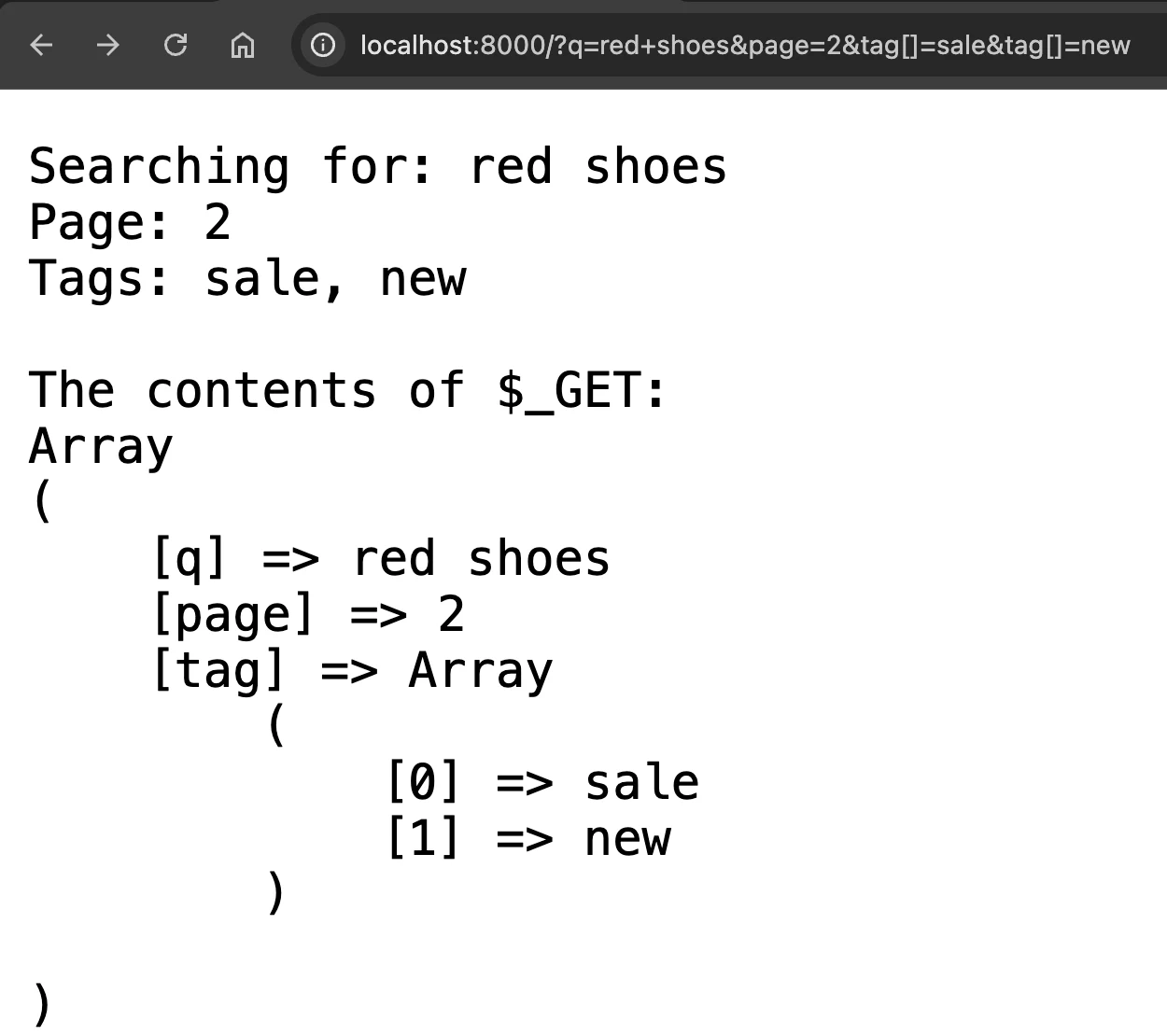
Everything after the ?:
- Pairs of
name=value, joined with&. - Encoded, so they survive the trip: a space is
+or%20, an&inside a value is%26. - Repeatable. PHP's convention: a name ending in
[], liketag[], collects every value into an array.filter[color]=redmakes an array with keys.
How It Works
- Something builds the URL: a link, a search form, JavaScript, or a person typing.
- The browser sends it as part of the request line:
GET /search?q=red+shoes. - PHP splits it up, decodes it, builds any arrays, and hands it to you as
$_GET.
Use a query string for things that describe what to show: what to search for, how to sort, which page. Those are safe to repeat, worth bookmarking, and worth sharing. Don't use one for anything that changes data (that's a POST, from Request and Response), or for anything secret.
And notice step one: "a person typing." As I've said before, never trust input. Whatever you expect in $_GET, someone can send something else. A missing value, an empty one, a word where you wanted a number, a negative page number, an array where you wanted a string. Your code decides what to accept.
Try It
A pretend search page that trusts nothing. In a folder, make index.php:
<?php
header('Content-Type: text/plain');

// Never trust input: each one can be missing, the wrong type, or nonsense.
$q = is_string($_GET['q'] ?? null) ? $_GET['q'] : '';
$page = filter_var($_GET['page'] ?? 1, FILTER_VALIDATE_INT, ['options' => ['min_range' => 1]]) ?: 1;
$tags = array_filter((array) ($_GET['tag'] ?? []), 'is_string');

echo "Searching for: $q\n";
echo "Page: $page\n";
echo 'Tags: ', implode(', ', $tags), "\n\n";
echo "The contents of \$_GET:\n";
print_r($_GET);Start the server the usual way:
docker run --rm -it -p 8000:8000 -v "$PWD":/app -w /app php:8.4-cli php -S 0.0.0.0:8000The usual server: PHP's built-in one, in a container, on port 8000.
Open this, and see what PHP made of it:
http://localhost:8000/?q=red+shoes&page=2&tag[]=sale&tag[]=newThe + became a space, and tag became an array. Now send it garbage, the way someone eventually will, with a bot, a hundred times a minute:
http://localhost:8000/?q[]=x&page=banana&tag=solo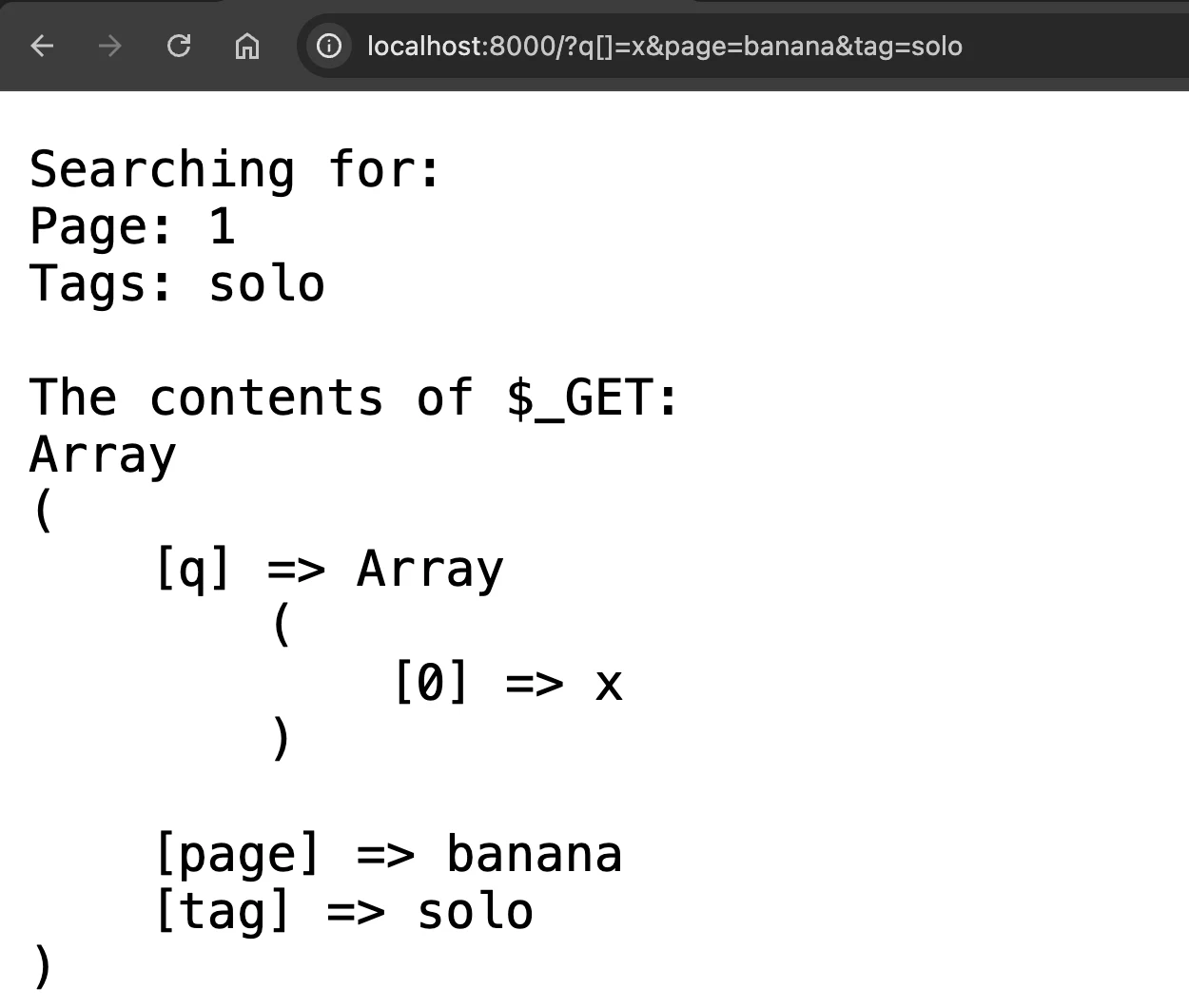
Look at the raw $_GET at the bottom: q arrived as an array and page as a word. The code at the top shrugged both off: an empty search, page 1. Try page=-5 too, or try to make the Page line say anything but a positive whole number. The PHP script won't let you. And try a search for <script>alert(1)</script>: it comes back as plain text, because the page says it's text/plain. On an HTML page you'd have to escape it yourself. That's the XSS lesson, in Security.
New to Docker or the terminal? Tools has the setup.
In PHP
$_GETis the query string, decoded, with arrays already built. Every value in it is input. Check it.filter_var()checks and converts in one step:FILTER_VALIDATE_INTwith amin_rangeis a page number,FILTER_VALIDATE_EMAILan email address. It returnsfalsewhen the value doesn't qualify.http_build_query()builds a query string from an array, encoding everything:['q' => 'red shoes', 'page' => 2]becomesq=red+shoes&page=2. Use it for every link you build; don't glue strings together.
Gotchas
- A string can arrive as an array. Add
[]to any name, and PHP makes it an array. Code that passes$_GET['q']straight to a function expecting a string then crashes. Check the type before you use it. - Query strings are public. They're written to server logs, saved in browser history, and can be passed to the next site you visit. Never put a password or a secret in one. (A private window keeps your own searches out of your history, but the site's server logs still get them.)
- A GET mustn't change anything. Browsers prefetch links, email scanners follow them, and search engines crawl them, so a link like
?delete=42will get followed by something that never meant to delete anything. That's the server's job to prevent: change things only on a POST, and refuse to on a GET. - They have a length limit. Around 2,000 characters is safe everywhere. Big data goes in a POST body instead.
Put the page's state in the URL
If a page shows a search, a filter, a sort order or a page number, keep it in the query string. Then the Back button works, a reload shows the same thing, and a bookmark or a pasted link brings someone exactly where you were.
You built these by hand to see how they work. Forms can build them for you, and can send their data in a POST body instead. Next: forms.