Web Nerdism w/ PHP 101 › Basics
HTTP, HTTPS and TLS
Phillip Harrington Nov 2026
DNS gave the client an address, and it has opened a connection. Now the two of them need a language. On the web, that's HTTP, the Hypertext Transfer Protocol: the music from Client/Server. It's simple on purpose. The client asks for something, the server answers, and that's one exchange.
What's HTTP?
The rules for that one exchange: a request, then a response. Each request stands on its own. The server doesn't remember you from one request to the next unless something reminds it (that's what cookies are for, later). And in its classic form, it's plain text you could read, or even type by hand.
What's HTTPS?
The same HTTP, sent through an encrypted connection. Nobody between you and the server (the coffee shop Wi-Fi, your internet provider, anyone along the way) can read the conversation or change it.
What's TLS?
Transport Layer Security, the encryption that puts the S in HTTPS. Its older version was called SSL, and people still say "SSL" out of habit, but SSL itself has been broken and retired for years. TLS does two jobs: it scrambles the conversation, and it proves the server is who it says it is, with a certificate. A certificate is the server's ID card, vouched for by a certificate authority your browser already trusts.
What the Padlock Means
Two things: the connection is encrypted, and you're talking to the domain in the address bar. That's all. It doesn't mean the site is honest. A scam site can have a perfectly good certificate for its own scammy domain.
How It Works
An HTTP request, as it travels, looks like this:
A method ( GET, "give me"), a path, the protocol version, then a few headers, then a blank line to say "that's my request." The response comes back in the same shape:
A status line ( 200 OK, "here it is"), headers, a blank line, then the page itself. Every part of those two has a job, and the next lesson goes through them line by line.
With HTTPS, one thing happens first: the TLS handshake. The client says hello, the server shows its certificate, the client checks it, and the two agree on keys. After that, exactly the same request and response travel through the encrypted connection.
HTTP/2 and HTTP/3
HTTP/2 packs requests and responses into binary instead of text, and sends many of them at once over one connection instead of one at a time. HTTP/3 does the same over a different kind of connection that copes better with flaky networks, like a phone on a train. The requests and responses mean exactly what they meant in HTTP/1.1, and your PHP code sees no difference at all. Usually the CDN or web server in front of your app speaks HTTP/2 or 3 with browsers, and you get it for free.
Try It
PHP can be the client too. In a folder, make a file called http.php:
<?php
$url = $argv[1] ?? 'https://example.com/';
$page = file_get_contents($url);

print_r(http_get_last_response_headers());
echo strlen($page), " bytes of page\n";Run it:
docker run --rm -v "$PWD":/app -w /app php:8.4-cli php http.phpSame as before: a throwaway PHP container, with your folder as /app, running one file.
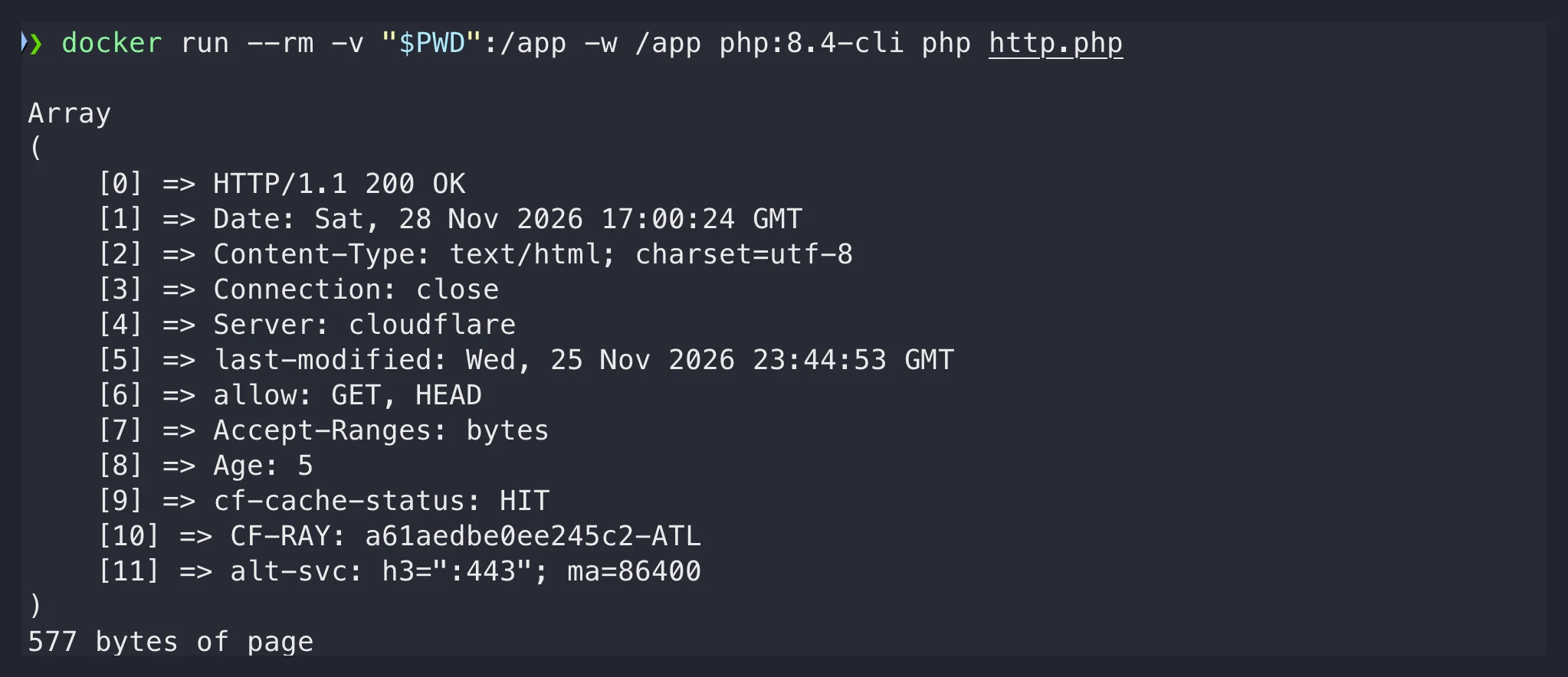
The first line is the status line: HTTP/1.1 200 OK. Then the response headers: the type of the content, when it was last changed, and a few that show a CDN answered (Cloudflare's, for example.com). Then the size of the page itself.
Now ask with curl, and add -v, for verbose:
curl -v https://example.com/ -o /dev/nullNew here:
-v- Verbose: show everything curl does along the way, not just the page.
-o /dev/null- Write the page to a file instead of the screen.
/dev/nullis the file that throws away whatever goes into it.
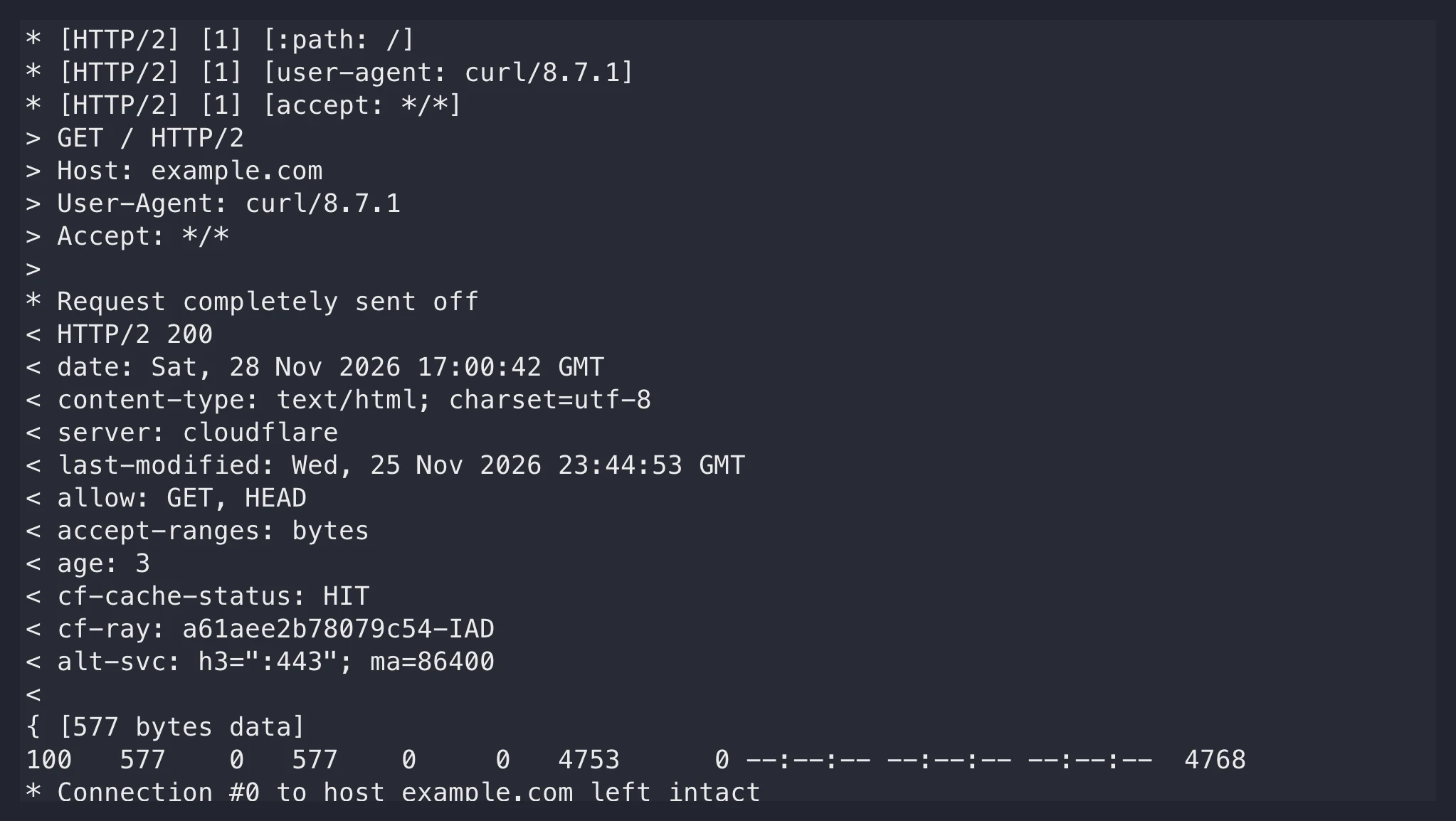
The lines starting with * are the TLS handshake: the TLS version, the certificate's name and who issued it, when it expires. The lines starting with > are the request curl sent, and < the response.
Look closely and the two clients didn't speak the same version: PHP said HTTP/1.1, and curl said HTTP/2. Same server, same page, same meaning.
New to Docker or the terminal? Tools has the setup.
In PHP
- The request you're answering is in
$_SERVER:$_SERVER['REQUEST_METHOD'],$_SERVER['SERVER_PROTOCOL'], and$_SERVER['HTTPS'], which is set when the connection to PHP was HTTPS. header()adds a response header, andhttp_response_code()sets the status. Both have to happen before any of the page is sent.file_get_contents()on a URL makes a simple request, andhttp_get_last_response_headers()shows what came back.
Gotchas
- Behind a CDN, PHP may think it's plain HTTP. The browser talks HTTPS to the CDN, but the CDN may talk plain HTTP to your server, so
$_SERVER['HTTPS']is never set. Code that asks "is this HTTPS?" gets it wrong. One app of mine sent its login cookies without the "HTTPS only" flag for months because of exactly this. - Mixed content. An HTTPS page that loads an image or script over plain
http://gets that part blocked or flagged by the browser. Usehttps://, or a link that starts with/. - Certificates expire. Let's Encrypt certificates last 90 days, on purpose, so that renewing is automated. If renewal isn't automated, it will be forgotten, and the site will break on a Saturday, right as you leave for the lake.
curl -I
curl -I and a URL asks for just the status and headers, no page. It's the fastest way to see what a server is actually saying: is it a redirect, and to where? Is it cached? Is it even up?
Every one of those request and response lines has a job. Next: the request and response, line by line.