Web Nerdism w/ PHP 101 › Basics
DNS
Phillip Harrington Nov 2026
In Client/Server, the server had to be easy to find. Computers find each other by number, the IP address, but people use names. DNS, the Domain Name System, is how a name like example.com turns into a number a client can connect to. It happens before every new connection, usually in a few milliseconds, and you only notice it when it breaks.
What's an IP Address?
The number a computer is reached at, like a phone number. The older kind, IPv4, is four numbers from 0 to 255 with dots between them: 203.0.113.7. The newer kind, IPv6, is much longer and written in hexadecimal with colons. Both are still in use, side by side.
What's a Domain Name?
The name people type instead of the number. It reads right to left, from general to specific: in www.example.com, com is the top-level domain, example is the name someone registered under it, and www is a subdomain the owner made up. The owner can make as many subdomains as they like.
What's a DNS Record?
A domain's DNS is a short list of records, each one a fact about the name. The ones you'll meet:
- A: this name is at this IPv4 address.
- AAAA: the same, for an IPv6 address.
- CNAME: a name for another record; go look that one up instead.
- MX: mail for this name goes to this server.
- TXT: a note, usually proof to some service that you own the domain, or rules about who may send its email.
- NS: these servers are in charge of this name's records.
Every record also has a TTL, "time to live": how many seconds anyone who looks it up may remember the answer before asking again.
How It Works
When your browser needs the address for a name, it goes like this:
- The browser checks whether it looked this name up recently.
- If not, your computer checks its own memory, and a small file called the hosts file, where you can pin names to addresses yourself.
- If not, it asks a resolver: a DNS server run by your internet provider, or a public one like Cloudflare's
1.1.1.1or Google's8.8.8.8. - If the resolver doesn't know either, it starts at the top. It asks a root server, "who's in charge of
.com?" Then it asks the.comservers, "who's in charge ofexample.com?" Then it asks that domain's own servers for the record itself. - The answer comes back down the chain, and every step remembers it for as long as the TTL allows.
That memory is why DNS is fast: almost every lookup is answered from step one, two or three. It's also why DNS changes are slow. Change a record, and the old answer lives on in caches all over the world until their TTLs run out.
Notice the resolver is a server to you and a client to the root, the .com servers and the domain's servers. Same relationship as last time, more links in the chain.
Step back and it's remarkable. Nobody runs DNS. Thousands of separate organizations, the root operators, every top-level domain's registry, every company and person with a domain, each run their own small piece of it, and they cooperate on nothing but an agreed set of rules. It was designed in 1983 for a few thousand computers, and the same design now answers for billions of them, all day, mostly without anyone noticing. It's one of the great pieces of engineering of the last century, and proof that the world can agree on something.
Try It
PHP can do DNS lookups itself, so start there. In a folder, make a file called dns.php:
<?php
$host = $argv[1] ?? 'example.com';

echo "gethostbyname: ", gethostbyname($host), "\n\n";

echo "A records:\n";
foreach (dns_get_record($host, DNS_A) as $record) {
    echo "  {$record['ip']}  (ttl {$record['ttl']})\n";
}

echo "\nMX records:\n";
foreach (dns_get_record($host, DNS_MX) as $record) {
    $target = $record['target'] === '' ? '(empty)' : $record['target'];
    echo "  pri {$record['pri']}  $target  (ttl {$record['ttl']})\n";
}Run it in a container, the same way as last time, giving it a name to look up:
docker run --rm -v "$PWD":/app -w /app php:8.4-cli php dns.php example.comOnly the new part:
example.com- Anything after the file name is handed to the script as an argument. PHP keeps them in
$argv, which starts with the script's own name, soexample.comis$argv[1]. This script looks up whatever name you give it.
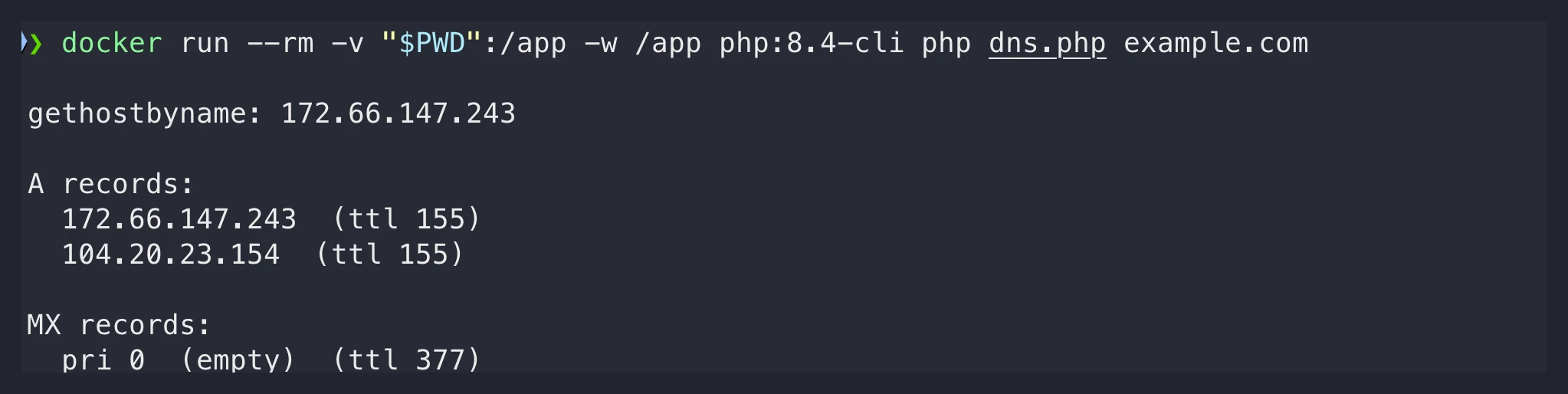
The first line is one address: gethostbyname() asks the question the way a browser would and takes the first answer. Then dns_get_record() shows the actual A records, each with its TTL. There's more than one: example.com sits behind a CDN, so the name points at more than one of the CDN's servers.
The MX record is where its email goes, and example.com's says "nowhere": priority 0, and an empty target. That's a null MX, a domain announcing it takes no mail, so senders don't even try. (example.com is reserved for examples like this one.) Try a name that does take mail:
docker run --rm -v "$PWD":/app -w /app php:8.4-cli php dns.php gmail.com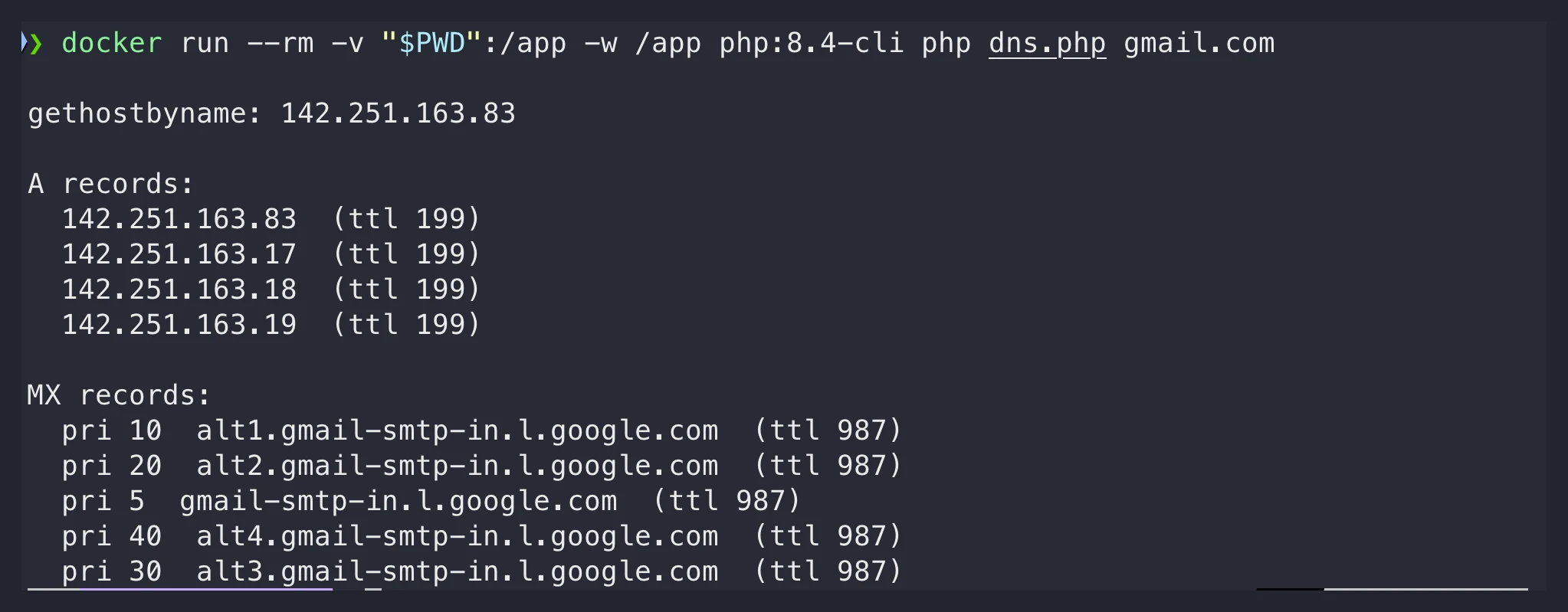
Five MX records, each with a priority number ( pri). Senders try the lowest number first, and work up the list if it doesn't answer. Then ask a different client, the one that comes with every operating system:
nslookup example.comnslookup- A DNS client. It asks your resolver for a name's records and prints the answer.
example.com- The name to look up.
Same answer, different client, and it works the same on every system. It also tells you which resolver answered, at the top. (If nslookup isn't there, get it from your package manager; on Ubuntu it's in dnsutils.) On a Mac or Linux, dig example.com is the one the pros reach for: more detail, TTLs included.
New to Docker or the terminal? Tools has the setup.
In PHP
Most of the time PHP does DNS for you without asking: connecting to a database by name, or fetching a URL, starts with a lookup. When you need one yourself, three functions cover it:
gethostbyname(): one IPv4 address for a name.dns_get_record(): the records themselves, any type.checkdnsrr(): does a record of this type exist? The classic use is a signup form:checkdnsrr($domain, 'MX')tells you whether an email address's domain accepts mail at all, before you try to send to it.
Gotchas
- "I changed it, but I still see the old site." The old answer is cached somewhere between you and the domain's servers. It goes away when the TTL runs out. Waiting is the fix; so is the $2 tip below, next time.
gethostbyname()doesn't fail like you'd expect. When a name doesn't exist, it returns the name you gave it, unchanged, notfalse. Check whether what came back is an address.- The hosts file wins. A name pinned in your hosts file never reaches DNS at all. That's how local development names like
myapp.testwork, and why a forgotten line in it can make one computer see a different site from everyone else.
Turn the TTL down before you move
Moving a site to a new server? A day before, lower the TTL on its records to five minutes. Then, when you switch, the old address only lingers for five minutes instead of a day. Once it's settled, turn the TTL back up.
Now the client has an address, and can open a connection. Next: the language they speak once they're connected, HTTP.