Web Nerdism w/ PHP 101 › Basics
Cookies
Phillip Harrington Nov 2026
HTTP forgets you. Every request stands on its own, so as far as the server knows, your second click comes from a stranger. And yet, sites keep you logged in, remember what's in your cart, and know you picked dark mode. That's cookies: a small piece of text the server asks your browser to keep, and to hand back with every request after.
What's a Cookie?
A name and a value, like theme=dark, kept by the browser for one site. The server sets it with a response header:
Set-Cookie: theme=dark; Max-Age=31536000; Path=/; Secure; HttpOnly; SameSite=LaxFrom then on, every request the browser makes to that site carries it back, in a request header:
Cookie: theme=darkThe trick: the server doesn't remember you; your browser reminds it, every single time.
The Settings After the Value
- Max-Age or Expires: how long to keep it. Leave both off, and it's a session cookie, gone when the browser closes.
- Path and Domain: which URLs it gets sent to.
- Secure: only send it over HTTPS.
- HttpOnly: JavaScript in the page can't read it.
- SameSite: whether other sites can make your browser send it.
Laxis the sensible default.
The last three are security, and they get a lesson of their own, Sessions and Cookie Flags. For now: login cookies get all three.
How It Works
- You visit a site. The browser has no cookies for it, so it sends none.
- The server answers with a
Set-Cookieheader. - The browser stores it, labeled with the site's name.
- Every later request to that site (pages, images, scripts, all of them) includes it in a
Cookieheader, until it expires.
To delete a cookie, the server sets it again with an expiry in the past, and the browser throws it away. In PHP, below, shows the one line it takes.
Notice step four, above. The cookie comes from the browser, which means from whoever controls the browser. A cookie is input, and you never trust input. Anyone can open their browser's developer tools and change a cookie to anything they like. So a cookie should never say "role=admin" or "price=1.00".
The usual move is to put a long random ID in the cookie, and keep everything that matters on the server, filed under that ID. That's a session, and it gets a lesson of its own.
Try It
A visit counter that lives in a cookie. In a folder, make index.php:
<?php
$visits = (int) ($_COOKIE['visits'] ?? 0) + 1;

// Wants a cookie?
setcookie('visits', (string) $visits, [
    'expires' => time() + 3600,
    'httponly' => true,
    'samesite' => 'Lax',
]);

echo "Visit number $visits.\n";Start the server the usual way:
docker run --rm -it -p 8000:8000 -v "$PWD":/app -w /app php:8.4-cli php -S 0.0.0.0:8000Open http://localhost:8000 and reload a few times. The number goes up: the browser is sending the cookie back, and the server adds one each time.

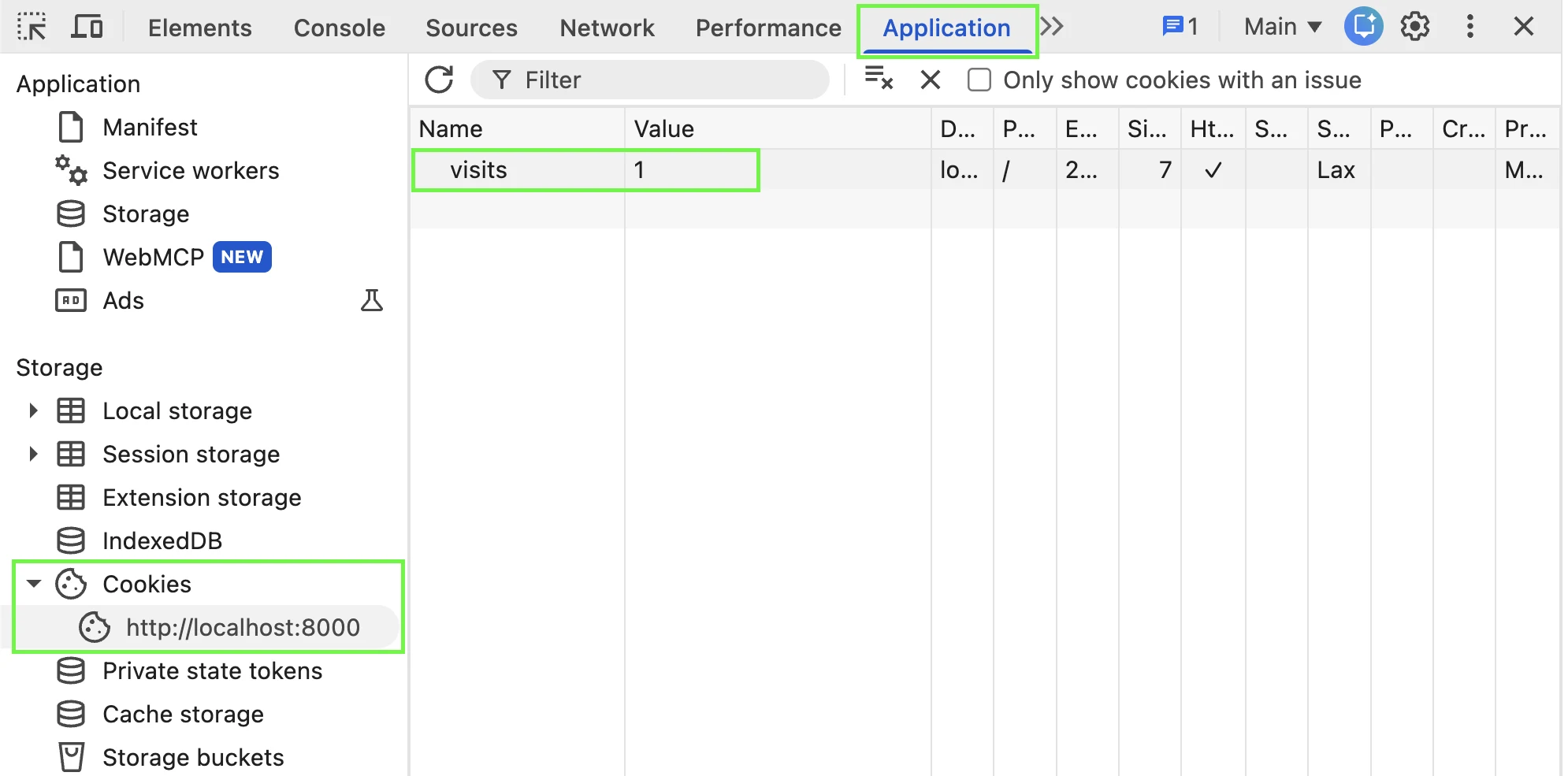
Now break it. Open your browser's developer tools, find the cookies for localhost (the Application tab in Chrome, Storage in Firefox), and change visits to 41. Reload: "Visit number 42." Of course it is. You just told the server something false, and it believed you. That isn't a classroom trick, either: plenty of real break-ins started with exactly that move. Or skip the browser entirely, and send any cookie you like:


curl -b 'visits=41' http://localhost:8000New here:
-b 'visits=41'- Send this cookie with the request, the way a browser would: name, equals sign, value.

Try -b 'visits=banana', too. The (int) in the code, a cast, turns nonsense into 0, so you get visit 1, not an error. That one cast is the code not trusting its input.

New to Docker or the terminal? Tools has the setup.
In PHP
setcookie($name, $value, $options)sendsSet-Cookie. The options array takesexpires,path,domain,secure,httponlyandsamesite.$_COOKIEholds the cookies the browser sent with this request. Treat every value in it as input from a stranger, because it is.- To delete one:
setcookie('visits', '', ['expires' => time() - 3600]);
Gotchas
- A cookie you just set isn't in
$_COOKIEyet.setcookie()only adds a header to the response. The browser sends it back starting with the next request. - "Headers already sent." A cookie is a header, so
setcookie()has to come before any output, likeheader()in Request and Response. - Cookies ride along on everything. Every image, script and stylesheet request to the site carries them too. Keep them small: a browser keeps about 4 KB per cookie, about a page of text, and all of it rides along with every image on the page.
- Never trust a cookie. It's input. It can be edited, replayed, or made up from scratch, as Try It showed.
A private window is a fresh cookie jar
Need to see your site as a stranger, logged out, nothing remembered? Open a private window. It starts with no cookies and forgets them all when you close it, so you don't have to clear anything from your real browser.
A cookie rides along in a header. There's an even plainer way to send a little data with a request, right in the URL. Next: query strings.