Web Nerdism w/ PHP 101 › Basics
Client/Server
Phillip Harrington Updated: Nov 2026
Most of the Internet works as clients and servers: a server at one end of the conversation, a client at the other. The two communicate using agreed-upon protocols, such as HTTP, which gets a lesson of its own. A server listens for requests, and a client makes them.
What's a Server?
The server is a program on a computer that binds to a port on that computer's network connection and listens for requests. Common server software includes nginx, Apache and Caddy.
The Hardware
Both the client and the server are software, running on physical (or virtual) computers that are connected to the Internet. The server has the added requirement of being easy to find, either by IP address or, much more often, by a domain name. (How a name turns into an address is the DNS lesson.)
The computer the server software runs on is usually also called a server, which is nice and confusing. Sometimes people say "physical server" to tell the machine apart from the software. The server is also sometimes called a "host," which is where "hosting" and "web hosting" come from.
The physical server may be a powerful computer in a data center, a rack unit in an office closet, or a forgotten PC under someone's desk. At a company that shall remain nameless, an entire operations app ran on one, and the development server where I cut my teeth was my own desktop. So long as it's connected to, and can be reached from, the Internet, it can act as a server. These days it's very often a virtual machine or a container in somebody else's data center, which is all "the cloud" means.
What's a Client?
A client is the program you use to connect to a server. That can be a web browser, an email program, an FTP program, a terminal, an app on your phone, and many other kinds of programs. When you browse the web or check your email, you're using a client.
How It Works
A conversation goes like this:
- The server listens for connections (it binds to a port).
- The client opens a connection (you click a link or check your email).
- The client sends a request, and the server responds with the information requested, or some kind of error.
- The client displays the response.
How Do They Talk?
The Internet runs on protocols: agreed-upon rules for how computers talk. This is how a Mac can talk to a Linux or Windows server. It's like musicians from different countries who've never met: hand them the same chart and they can play together, without a word in common. Music is the protocol.
HTTP is one such protocol, the one web pages (and most of the apps on your phone) travel over, and it gets a lesson of its own soon. For now, just know that the https:// at the start of a web address names it: HTTP, plus an S for secure.
What's in the Middle?
Your client rarely talks straight to the server that does the work. On most sites, your browser talks to a CDN: a network of servers around the world that keeps copies of pages close to you and passes everything else along to the real server. There may be a load balancer or a reverse proxy in there too.
This page came to you through one.
Each of those is a server to whatever is in front of it and a client to whatever is behind it. Same relationship, more links in the chain. They get a lesson of their own.
Try It
You're going to be both ends of the conversation: the server and the client, on one computer. PHP comes with a small built-in web server, which is all you need, and you'll run it in a container, so there's nothing to install but Docker. Make a folder, and in it a file called index.php. (Why that name? It's the file a web server looks for when you ask for a folder. More on that in Document Root.)
<?php
echo 'Hello from the server.';Then, in a terminal, in that folder, start the server:
docker run --rm -it -p 8000:8000 -v "$PWD":/app -w /app php:8.4-cli php -S 0.0.0.0:8000What's new:
-p 8000:8000- Connect port 8000 on your computer to port 8000 in the container. Your computer's side comes first.
-S- Start PHP's built-in web server instead of running one file.
0.0.0.0:8000- The address and port for it to listen on: every address, port 8000.
That's step one from above: the server binds to a port and listens. Most of that line is Docker; the PHP part is the end, php -S 0.0.0.0:8000.
Now be the client. Open http://localhost:8000 in your browser. localhost is the name every computer uses for itself. You'll see "Hello from the server." And back in the terminal, the server has logged a line for your request: one side of the conversation, written down.
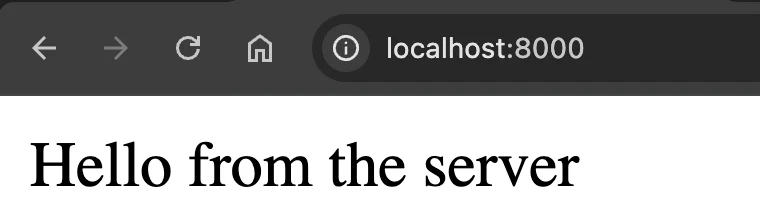
Two more things to try. Ask again with a different client, from a second terminal:
curl http://localhost:8000curl- A web client for the terminal. It sends a request and prints the response.
http://localhost:8000- The address to ask: your own computer, port 8000.

Same server, same answer, different client. Then go back to the first terminal, stop the server with Ctrl+C, and reload the browser. It can't connect, because nobody is listening on port 8000 anymore. That error is what "the server is down" looks like from the client's end.
No Docker yet? Tools has the one install (and WSL, on Windows).
Gotchas
- "Port is already allocated." Something else is already listening on 8000. Pick another port on your side:
-p 8001:8000, then openlocalhost:8001. - Inside a container, localhost is the container. Not your computer. A server in a container that listens only on localhost can't hear anything from outside it, which is why Try It says
0.0.0.0. - "Connection refused" isn't "timed out." Refused means the machine answered, but nothing is listening on that port: your stopped server, for example. Timed out means the machine never answered at all, so the problem is the address or something on the way there.
Is it the client or the server?
When something won't load, find out which end is broken before you fix anything. Try a different client: another browser, curl, your phone with Wi-Fi off. If the second client works, the server is fine and the problem is on your end. If nothing can reach it, it's the server, or something between you and it, like DNS.
Everything you typed into the browser in Try It was a URL. Next: what each piece of one means.