Web Nerdism w/ PHP 101 › Basics
Anatomy of a URL
Phillip Harrington Nov 2026
In Client/Server you opened http://localhost:8000. That's a URL, a Uniform Resource Locator: one line of text that tells a client which protocol to speak, which server to talk to, where to knock, and what to ask for. Every link you've ever clicked is one. Here's a full one, with every part filled in:
The Parts
Scheme: https
Which protocol to use. https and http for the web, but there are others: mailto: opens your email program, file: opens a file on your own computer. I always wondered why that one gets three slashes, as in file:///Users/you/notes.txt. It's the usual two, then an empty host (it's your own computer, so there's nothing to name), then the path, which starts with a slash of its own.
Host: www.example.com
Which server. A name, which DNS turns into an address, or the address itself. The www is a subdomain the owner chose, nothing more.
Port: 8080
Which door on that server. You almost never see one, because each scheme has a default: 80 for http, 443 for https. Leave it off, and the browser uses the default. Your Try It server needed :8000 because it wasn't on either.
Path: /blog/post
Which thing on that server. It looks like folders and a file, and sometimes it is, but each server decides what a path means. In a PHP app, every path usually goes to one script that decides what to show.
On this site, most pages, like /about, are files with no extension. (The server still labels them as HTML: that's Content Types, a few lessons on.)
Query String: ?sort=new&page=2
Extra instructions for the server, after a ?: pairs of name=value, joined with &. Here, "sort by newest, show page two." In PHP they arrive in $_GET. Query strings get a lesson of their own.
Fragment: #comments
After a #, the name of a spot on the page. If the page has an element with that id, the browser can scroll to it. And it never sends the fragment to the server: it's the one part of a URL that stays in your browser.
How It Works
When you follow a link, the browser takes the URL apart, left to right:
- The scheme says which protocol to speak.
- The host gets looked up in DNS, to find the server's address.
- It connects to that address on the port, or the scheme's default.
- It asks the server for the path, with the query string attached.
- When the page arrives, it can scroll to the fragment.
Some characters can't go in a URL as themselves: a space, or an & that's part of a value rather than a separator. They're written as a % and two hex digits instead. A space is %20. That's percent-encoding, and it's why some links look like they were typed by a cat.
Links inside a page usually leave off the scheme, host and port, and start with just the /. A link to /about on this site means "same scheme, same host, this path", and the browser fills in the rest from the page you're on. That's a relative URL.
Try It
PHP can take a URL apart for you. In a folder, make a file called url.php:
<?php
$url = $argv[1] ?? 'https://www.example.com:8080/blog/post?sort=new&page=2#comments';

print_r(parse_url($url));Run it the usual way:
docker run --rm -v "$PWD":/app -w /app php:8.4-cli php url.php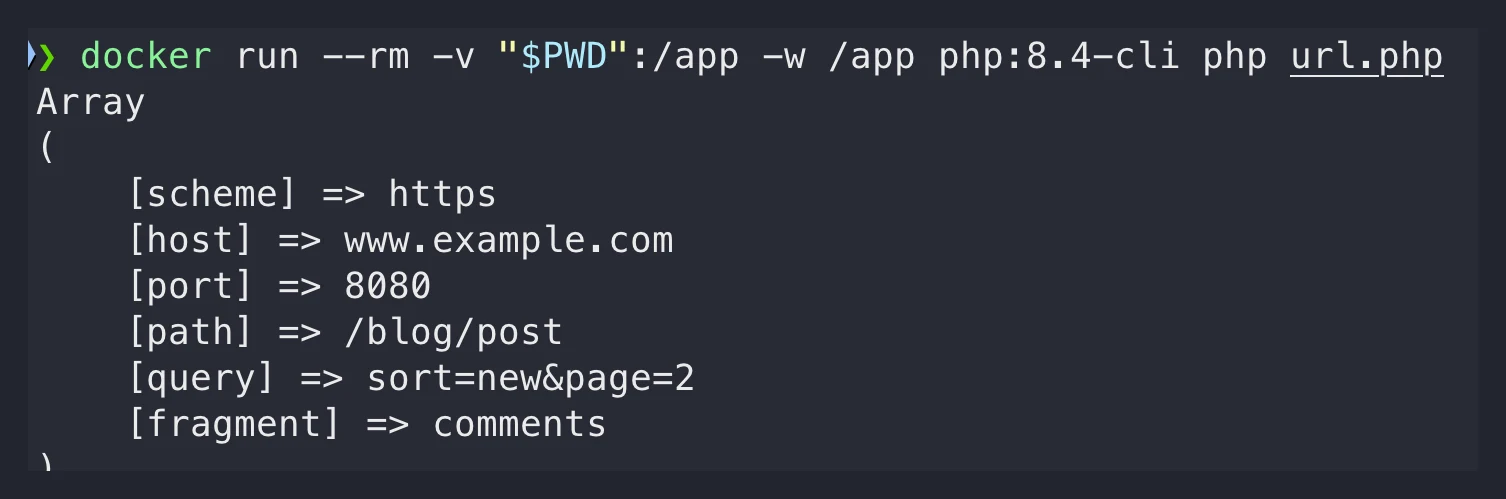
Every part, labeled. Give it a URL of your own to pick apart, in quotes, after url.php.
Now see which parts reach a server. Put this in index.php in the same folder:
<?php
echo 'Path and query: ', $_SERVER['REQUEST_URI'], "\n";
print_r($_GET);Start the server from Client/Server again:
docker run --rm -it -p 8000:8000 -v "$PWD":/app -w /app php:8.4-cli php -S 0.0.0.0:8000And open a URL with every part in it:
http://localhost:8000/anything/you/like?name=you&page=2#here
The server shows you the path and the query string, and $_GET with the query already split into names and values. The #here isn't anywhere. The browser kept it.
New to Docker or the terminal? Tools has the setup.
In PHP
parse_url()takes a URL apart.$_SERVER['REQUEST_URI']is usually the path and query string of the request you're answering, and$_GETis its query, already decoded.http_build_query()goes the other way: it turns an array into a query string, percent-encoding as it goes.rawurlencode()encodes one value to put in a path.
Gotchas
- The server never sees the fragment. Anything after the
#stays with the page: the browser can scroll to it, and JavaScript in the page can read it, but PHP never sees it. - Build query strings, don't glue them. A value with an
&in it ("Salt & Pepper") breaks a query string assembled by hand.http_build_query()encodes it for you. parse_url()doesn't check anything. It splits whatever you give it, as well as it can. To ask whether something is a valid URL, usefilter_var($url, FILTER_VALIDATE_URL).
Link to the exact spot
When you send someone a link, send them to the part you mean. Most docs and blogs give their headings ids (every heading on this site has a link icon for it), so add the fragment: /php/dns#gotchas. You can even link to a sentence: in Chrome, Edge or Firefox, select it, right-click, and choose "Copy link to highlight."
The host is a name, and a browser can't connect to a name. Next: how it turns into an address.